

ExpressBites Food Delivery App
A food delivery app that aims to provide a user-friendly and efficient way for users to order food from their favourite restaurants.
OVERVIEW
In today's fast-paced world, people are increasingly relying on food delivery apps to satisfy their hunger cravings. With so many options available, it's important for food delivery apps to provide a seamless user experience that makes it easy for users to find and order their favourite foods.
This project focuses on the design process for a food delivery app that aims to provide a user-friendly and efficient way for users to order food from their favourite restaurants. We'll walk through the research and design process to create an app that meets the needs and expectations of hungry users.
TIMELINE
January - April 2023 (12 weeks)
MY ROLES
-
UX Designer,
-
UX Researcher,
-
UI Designer
TOOLS
-
Figma
-
Miro
-
Google Docs
-
Google Spreadsheet
-
Google Meet (for interviews)
-
Dovetail (for interview transcripts)

DESIGN PROCESS
For the UX process of ExpressBites, I used the Design Thinking approach. This method emphasizes a deep understanding of the user's needs and experiences to create a solution that truly addresses their needs.
The process begins with empathizing with the user, to understand their needs and challenges in the context of food delivery. Then, I will define the problem and ideate possible solutions. Prototyping is the next step, allowing for the creation of mockups to test the design with users. Finally, user testing is conducted to get feedback and validate the design. By using the Design Thinking approach, I can ensure that ExpressBites meets the needs of users, and is easy and enjoyable to use.

01 - EMPATHIZE
User interviews:
understanding the users.
Before designing the app, I decided to conduct extensive user research to gain insights into the target audience and the competition.
The best way to truly understand the needs and motivations of the people I’m designing for is by hearing from them. So, I interviewed Twelve (12) working adults aged between 18 and 65 years, who have experience with ordering food online.
The interview questions encouraged the participants to analyze the features and user interfaces of three popular food delivery apps to identify best practices and areas for improvement:
-
SkipTheDishes;
-
Uber Eats;
-
DoorDash
The participants’ responses can be summarized as follows:
-
Convenience is the most important factor
-
Variety of options matters
-
Time estimates are crucial
-
Navigation should be intuitive
You can check the interview protocol and responses summary here.
User personas:
understanding the users.
After the user interviews, I further analyzed the data and created two user personas. In this section, we will explore two personas, which are fictional characters.
The personas we will examine are Sarah and Mike, two different individuals with unique needs and preferences.


Competitive analysis:
understanding the competitors.
In order to create a successful food delivery app, it is also important to understand the competition and their strengths and weaknesses.
I conduct a competitive analysis to evaluate the key players (SkipTheDishes, Uber Eats, DoorDash) in the food delivery app market. By examining their features, user experience, and overall market position, I gained valuable insights that will inform my own design decisions and help us create a product that stands out in the crowded space of food delivery apps.
See Competitive Audit report here.
02 - DEFINE
Pain points:
defining the user pain points based on the research data.
After conducting the user interviews and further analyzing the data, I've gained valuable insights of the main frustrations users were experiencing while using food delivery apps. The main user pain points included:
-
Confusing checkout process: Some participants reported having difficulty with the checkout process, which can be complicated and confusing. They mentioned that they sometimes have trouble adding or removing items from their cart or applying discounts and promo codes.
-
Inaccurate time estimates: Some participants reported that the estimated delivery time provided by the app is sometimes inaccurate, leading to frustration and disappointment.
-
Unreliable service: A few participants reported experiencing issues with the delivery service, such as delayed or incorrect orders. They expressed a desire for an app that provides reliable and consistent service.
How might we
- design a food delivery app that automatically save users' preferences and their favourite items for fast checkout with reliable and trackable delivery?
03 - IDEATE
Sketching:
generating ideas for the screen flows and user flows.
After defining the pain points of my target audience, the next step is to ideate the solutions.
I chose sketching as my technique to generate ideas. Sketching involves creating rough, hand-drawn sketches of various design concepts and user interface elements, which allows me to quickly and easily explore different ideas and iterate on them before moving on to more detailed designs for the food delivery app.
Sketching user flows:

Sketching screen flows:

User flows:
mapping out the steps users take to achieve their goals.
After the sketching part of the process, I decided to focus on one user flow: browse the app, order the food, and track the delivery.
I created the user flow diagram to map out experiences for the user task mentioned above. This diagram visually aided in my planning of the design, allowing me to better understand what the interface needed to provide the user for a positive usage experience.
Users browsing, ordering, and tracking food

04 - PROTOTYPE
Wireframes:
simplified visual representations of the layout and functionality.
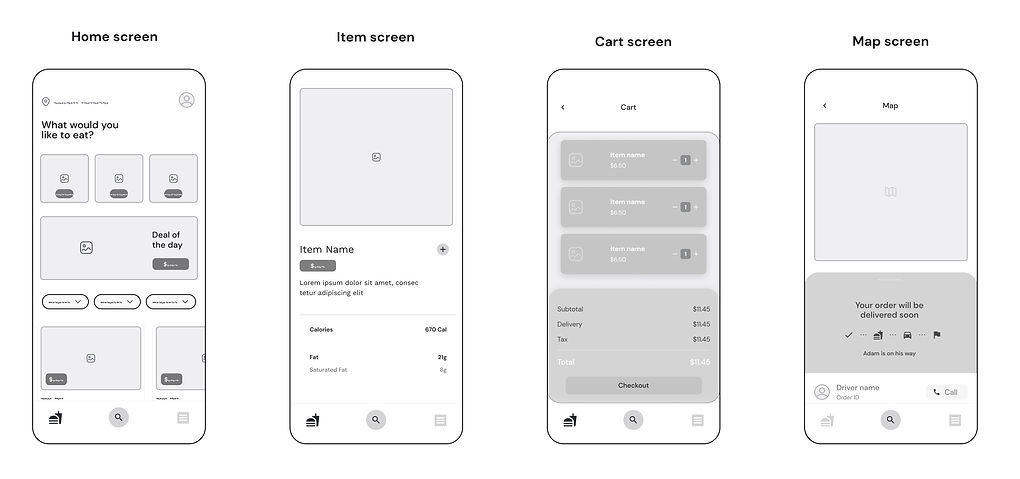
With the user flow mapped out, I then proceeded to create digital wireframes in Figma. Several iterations of each screen were created to ensure that the elements that made it to the digital wireframes effectively addressed the user pain points.
From browsing the menu, checking the item details, adding the item to the cart, to checking out and tracking the delivery. These wireframes played a critical role in designing an intuitive and user-friendly food delivery app that allows users to quickly and easily order food from their favourite restaurants.
05 - TEST
Usability testing:
test the design and functionality of the app.
In this stage, the goal is to test the product's design and functionality to identify areas for improvement before turning it into high-fidelity.
For the food delivery app, I conducted five (5) usability tests to gather feedback from potential users to ensure that the app meets their needs and expectations.
The tests evaluated the app's design, functionality, and user interface, and identified areas for improvement to enhance the user experience.
You can see the usability test summary here.
FINAL DESIGN
The final design of the ExpressBite food delivery app.

Step 1:
Landing on the home screen of the app.
After opening the food delivery app, the user would land on the home screen which shows the user's delivery location, the food category, and the current promotion.
Step 2:
Clicking on the desired item.
After browsing the menu, the user would be able to click on the desired item in order to get a better picture of the item.


Step 2.1:
Browsing the food menu.
The user would be able to browse the food menu by clicking the desired category and scrolling down the screen.
Step 3:
Checking the item details and go back to the home screen.
Once the user is on the item screen, the detailed information about the item can be shown by dragging up the information label on the bottom of the screen. After looking at the label, the user can go back to the previous screen by clicking the "back" button.

Step 5:
Checking out item and tracking delivery.
In the cart screen, the user can checkout the items by clicking the "checkout" button.
Once the button is clicked, the user will be taken to the tracking screen. The tracking screen will show the estimated delivery time, the delivery person's contact information, and a map to show the distance of the delivery to the user's address.

Step 4:
Adding the item to cart.
On the food item screen, the user can add the item to their cart by clicking the "plus" button.
After clicking the button, the "plus" button would turn into a "check" button for one second along with the cart button pop up to signal that the item has been added to the cart successfully.

High-fidelity UI Components

NEXT STEPS
Some next steps that I'd take for the project.
After the design thinking process, the ExpressBites food delivery app has been designed and tested to better serve potential users. Based on the insights and feedback gathered during the process, I've come up with some ideas for the next steps in the development of the food delivery app:
-
Iteration and Refinement: The next step is to iterate and refine the app design based on the feedback gathered from the usability testing. This includes making improvements to the UI design, ensuring that the app is user-friendly, and addressing any usability issues that were identified.
-
User Testing: It is recommended to conduct further user testing to evaluate the app's performance and usability with a larger sample size of participants, who are representative of the target audience.
-
Continuous Improvement: Finally, it is important to continually improve the app based on user feedback and behaviour data. This will help ensure that the app remains relevant, user-friendly, and competitive in the ever-evolving food delivery industry.
-
Marketing: I'd like to create a website as well as a social media campaign to promote the app.
Overall, by taking these next steps, I hope the food delivery app can continue to provide a seamless user experience for customers, while also meeting their needs and expectations.
REFLECTION
Throughout this food delivery app project, as a solo UI/UX Designer, I faced several challenges and successes. I started with an initial ideation phase where I brainstormed ideas and came up with a unique concept for the app. The wireframing process was instrumental in mapping out the app's layout and features, which helped me create a solid foundation for the project.
During the prototyping stage, I encountered some difficulties in creating the high-fidelity prototypes. Integrating motion graphics was a challenge, but I was able to overcome it with additional studies and research. The prototypes turned out to be successful in showcasing the app's features and functionalities, allowing me to test and refine the user experience in the future.
Overall, the project's success was evident in the final product. The app had a clean and intuitive design that made it easy for users to order food, track their delivery, and make payments.
This project was a valuable learning experience that helped me hone my UX UI design skills and create a successful food delivery app.